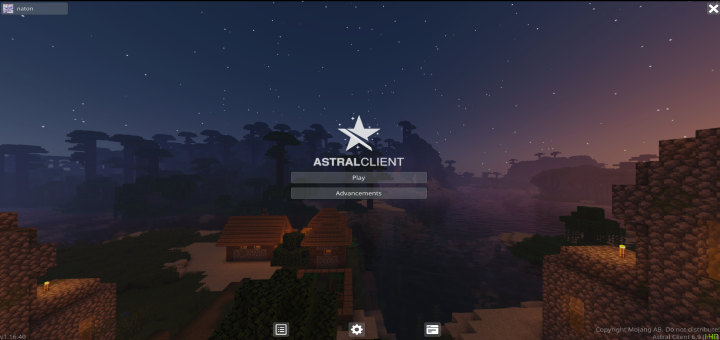

Astral Client V6.9

Astral Client V6.9

By Astral Developers Published 2 May 2020 · Updated 22 Oct 2020
4

"The Cleanest UI in Minecraft Bedrock Edition." - PatarHD123

Astral Client
is an all-in-one optimization client-resourcepack for Minecraft Bedrock Edition.  It offers a variety of features such as unlocked V-Sync and Max Framerate Settings, Optifine features and more.

Owner: naton#0001

Developers: light#8318, BariPlayzYT#6609, and Bloodless#2600, and MichaelBricks#7744, PolrFlare#7193, BluCane#8193, Jegox#6103, Jaidyn
#7486, Argued168#9999, mat345st#0001

We host weekly events and updates on our Discord server, as well as giveaways and early access. You can also report bugs, suggest features or get help from us. Click on this text to join the Discord server.

Select version for changelog:

Changelog

BUG FIXES

- Fixed controller cannot press the "players" button.

- Fixed the extra percentage sign %% on the languages screen.

- Fixed the missing X storage button for Lite.

- Fixed the issues with the disconnect screen.

- Fixed the world size MB text not fitting into screen.

CHANGES

- Added an "About Astral" screen on the settings.

- Added the astral logo and text in both pause screen and progress screens.

- Added clear bottomchat option.

- Added a new character creator screen.

- Added a player renderer in the chest screen to remind you what armor you're wearing during skywars/bedwars.

- Added store button (located in the top right corner) for servers who have in-game stores (Mainly featured servers).

- Added (only a few) hovered tooltips for some settings in the video tab.

- [EXPERIMENTAL] Ping counter when hovered the ping icon (Not accurate, due to bugs with Minecraft's code.)

- The HUD will now show on containers/screens.

- Removed the strong/weak hit sounds.

- Adjusted the buttons' design.

- WHITE BLOCK OUTLINE is temporarily removed for now due to shader glitches.

- Bottomchat will now use your own texture pack's HUD GUI textures instead of forcing to use Astral's.

NOTE: If you enable bottomchat + astral GUI textures, it will use the darkmode hotbar and icons.
Installation

Supported Minecraft versions

Installation Guides

1
1
is this good?
1
has this been discontinued?
1
These kids mad as if it weren't their dumbasses who clicked and downloaded it even though it clearly says not to, so before you whine about your stupid worlds that probably looks like crap, maybe learn to,i don't know, F*cking READ. You all know damn well its all your fault for not listening in elementary, I doubt most of you even go to one.
1
SkellyDaModMaker999 October 14, 2022 at 4:02 pm
NOTICE: Everyone, I know that you are having bad experiences with the astral client. But the thing is, This is an older version of Astral Client and It will not work on your devices. To get the latest version of Astral Client, go to the discord server or the main website, AND REMEMBER DON'T DOWNLOAD IT FROM ANY OTHER WEBSITE! I am not a moderator on Astral Client but this is just a notice for players who are having bad experiences with the pack. Kind Regards -Skelly
1
WHAT THE MOTHER F*ck report this resource pack and get him BANNED
1
It’s made for an older version but there is an updated version look it up
1
so many kids mad lol
you guys should not download without knowing the supported minecraft version
the supported minecraft version is 1.16, and you guys are still downloading this "client" in 2022
if your minecraft keeps crashing, do this (only for windows):
copy this path (change "user" to your windows username)
C:\Users\user\AppData\Local\Packages\Microsoft.MinecraftUWP_8wekyb3d8bbwe\LocalState\games\com.mojang\resource_packs
1
Agreed. Some people just don’t understand that YOLO
1
DONT INSTALL! It just crashes and has caused my entire pc to freeze and need a restart twice! f**k this.
1
This comment has been removed
1
First of all, RELAX. I understand that your upset, but there is a way to fix this. You need to go into the games files, then go into com.Mojang, then resource_packs. From there, you can delete the astral client file and fix your game. And jeez, what’s with the death threats?
1
You monster you made me delete the entire game WITH MY WORLD THAT TOOK 10 YEARS TO BUILD I HOPE YOUR PACK GETS SHUT DOWN FOREVER BECAUSE YOU CANT FIX A SIMPLE GLITCH YOUR A LAZY BUM WHO SITS ALL DAY ON THE COUCH WATCHING NETFLIX AND THEN I RE INSTALED MINECRAFT AND MY WORLD THAT I TOOK 10 YEARS ON WAS DELETED HERES THE GLITCH BUT I ALREADY KNOW YOUR NOT GOING TO FIX IT EVERY SINGLE TIME I PRESS OPTIONS, SETTING, AND NEW WORLD THE ENTIRE GAME CRASHES THIS IS WHY YOU HAD NO FRIENDS IN SCHOOL AND THATS WHY YOUR DAD LEFT YOU WHEN YOU WERE 12
1
um they did fix the glitch and its actually because this client is for an older mc version, didn’t you read that it only supports 1.16? On that note, my condolences for your lost world that must really suck
1
Completely useless, it looks cool but after installing (at least on my version of Minecraft) it completely crashes when you try to click anything, I don’t think this is the case for everyone and I hope this works for you guys
1
The Original Enderman May 16, 2022 at 6:22 pm
HOW DO YOU GET RID OF IT IF YOUR ON EDUCATION EDITION?!?!?!?!
IT JUST CRASHESH!!!!!!!!!!
1
1. Why are you installing a pack for MCEDU?
2. This client doesn’t support anything other then 1.16 but there is an updated version on another site
1
what site?
1
with 6.9, whenever i opened the settings screen, it crashed, i hope 6.10 fixes that
1
Please Fix the Bug when i clicked "Start Game" it Crashes please fix it and btw where can i find the Astral MaxFPS?