


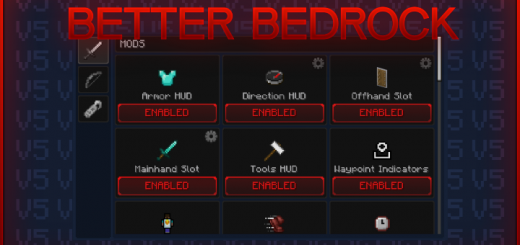
The Better Bedrock Texture Pack is the most powerful, useful, customizable and FREE Texture Pack available on the majority of platforms! Enhance your gameplay experience by multiple mods and options to adjust!
Mod Menu
- To open the mod menu, you must pause the game and click twice on green M button in bottom left corner (for controller input, enable correct subpack in pack settings - settings/global resources/bb pack)
- Gray values next to elements indicate the config value to make configuration editing easier
- To save mod states locate Better Bedrock Texture Pack in local files - com.mojang/resource_packs/betterbedrock.../ui/_global_variables.json, open _global_variables.json file and then edit values (e.g. true -> false, 0.6 -> 0.8, 2.4 -> 4.0)
Mobile App:
- By Better Bedrock App available only for android users you can edit and save config without any 3rd party text editors! Just open config editor tab, select BB pack and simply click on buttons! With our app you can also easily edit cape colors in real time and many more!
- To download the app, visit our website or join our Discord server
Website:
We are excited to announce the release of the official website for Better Bedrock! Visit betterbedrock.com to check out or download latest content and see future updates!
Known Issues:
- Long HUD loading time is caused by old UI engine used to create Better Bedrock, HUD elements take longer to load. Unfortunately, we cannot prioritize elements based ontheirvisibility, so everything you see on the HUD is loaded at once, which can cause lag spikes when you enter world
- Laggy gameplay is also related with old UI engine and our not really adapted dynamic mods such as armor, direction HUD or values in bottom left and right corners.Disablesome mods (prioritize dynamic mods) and you should notice less lags
- Not visible touch controls customization elements in HUD because for some reason due huge Better Bedrock custom elements, it just disappears, yes just disappears and wearenot really able to bring it back
- Not visible default minecraft cape, it's because of Dynamic Mods that modify player model to render more complex values. If you equip minecraft cape, it's still visibleforother players, you just can't see this in your pov and because of this, we added custom cape that is only visible for users with Better Bedrock Texture Pack. To add thiscape,edit your skin image by horizontally adding 2 pixles in top left corner
Special Thanks:
PatarHD: And other content creators for reviewing and promoting Better Bedrock
Chainsketch: General help with UI and entity stuff
TLGM2308: General help with UI
Contact:
- Website: betterbedrock.com
- Discord: dsc.gg/betterbedrock
- Youtube: youtube.com/@axmbro
- Email: [email protected]
Creators:
- AmBro: Texture Pack
- iDarkQ: Mobile App & Website
Donate:
You can support us by this link: paypal.me/szefambro It's not required but we appreciate all types of support. If you would decide to donate us, please create ticketondiscord and you will receive VIP ROLE as a thank you!
Select version for changelog:
ADDED
- Optimized code (game should run a bit smoother while hud load time should stay same - when you join on world hud loads max 2/3sec)
- New fogs and player entity stuff (compatibility with major 1.20 update)
- New modules and their settings (Coords, Chat, Durability Viewer, Crosshair Item Count, Lightener, Paper Doll)
- New variables to config file (other section - for more complex modifications)
- Compatibility for pocket UI profile (still not recommended :D)
- Separated safe area x and y sliders (hidden ones for vanilla texture pack)
- Players count in pause screen (list on right)
- Dynamic sizing text input in chat screen
- Enchantments text in normal, readable font in enchanting table
- Position based: position in chunk and chunk index
- Options to hide each text in debug menu
- Custom tags from Tab List module to list in pause screen
- Missing 'Minecraft Events' button in start screen
- New extension packs (Dark UI, Better Fogs, Waypoints, Particle Limiter, Low Fire, Full Grass, Clean Glass, Clean Water)
ADJUSTED
- Main screens (start, play, hud, dialog)
- Mod Menu layout and size
- All modules (in most cases - position and alignment)
- Gamma module name to Lightener
- All button types (added gamepad outline)
- Cape position (now cape should not overlap with armor while jumping)
- Debug menu wrong item ids (1.20 automatically changed them)
- Fixed waypoint issue (you was not able to create waypoint when live paper doll was enabled)
- Mod Menu scrolling panels (now each section has their own scrolling)
- Crosshair size slider range
- Clickable Mobile Shortcuts module on hud (perviously you had to open pause screen, currently it's fixed)
- Mobile Shortcuts textures to latest icons
- Multiple texts in hud (alignment)
- Missing 'Clear Logs' button in content log screen
REMOVED
- Server IP module (was only available on a few servers that made no sense)
- A few options in mod menu settings tab (boss bars percentages, title/subtitle font sizes)
- Removed Controller Keysotrkes module (for some reason it stopped working)
If you have errors related to HUD, please make sure your pack is up to date, we post updates on our betterbedrock.com website to match and fix possible issues with newer minecraft updates.
If you options reset after changing dimension, please set up config which is in texture pack files. For more info and even detailed description and tutorial videos please join our discord and just type !config.
Thanks for your all opinions and reviews of Better Bedrock. We are trying our best to provide you the greatest gameplay, however our current time situation is hard to manage and minecraft UI system does not really get updated...
The problem becomes worse when using backpack mods. While scrolling inside the backpack interface, the item in my hand changes, which immediately closes the backpack since it is no longer selected. This makes the backpack feature almost unusable with the texture pack.
Additionally, I noticed that the pack correctly shows the durability and icons of armor and tools from mods when the inventory is fully open, but this information does not appear in the minimized HUD where you are supposed to see the equipped armor.
Could you please look into this issue? It would be very helpful if the scroll wheel could be restricted to the interface menus only, without affecting the hotbar selection.
Thank you for your work on this pack—it’s visually amazing, but this bug makes it difficult to use with certain mods.