
Spectra Shader

Spectra Shader

By Hiroki Yakimoto Published 21 Mar 2021 · Updated 30 Jun 2022
4.3

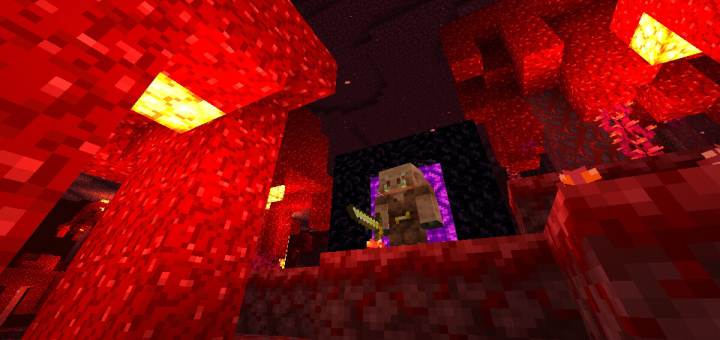
This is a lighter and better looking shader pack for Minecraft PE. The light differs in each room, the night is darker, but you can still see clearly. Shadows are good and the Nether is spectacular.

Select version for changelog:

Changelog

I just modified the Shader description, I don't even think I should put a change log

Installation

Supported Minecraft versions

Resolutions

Installation Guides

Pinned comment
1
There's some errors BUT its perfect i love it ! Especially the colors and brightness , I'll comeback after i build something on my new world :D - Android 10 user
1
The only thing I hate about Minecraft is for removing this Shader, it was and is too good even without its ray tracing, I hope they can come back one day.I think many of us miss him.
1
This is the first shader that I loved there's only one problem that the three dots that can open the inventory is missing or Dissapearing hope you can fix it❤
1
I didn't even know that there was still someone who used this Shader hahaha, after the Minecraft engine was changed this Shader stopped working, but this "problem" two 3 points is normal, it shouldn't appear.
1
Hey bro, update for 1.18
1
Cool shader, especially the siund effectsm i love it :D - So i have quite a few opinions and ideas to make stuffs more cool and natural, some are inspired from other shaders too, i would like to tell those if you want!
1
5 stars btw, and typo,
Sounds*
Effects*
1
I'd love to talk to you about discord. I would love to help
1
man i would love your help, and thanks for your feedback. Send me your Discord and I'll say hello
1
1
AnThTony#1677
1
I am always looking for a good shader. I consider this to be the best. He is the only one of all who has a little of everything.
corrections:
1 The color of the water is not good. (Looks dirty)
2 Shading the trees darkens the leaves
Recommendations:
1 it would be great to add realistic water. with sun rays. underwater
(sorry I do not speak English)
1
Nothing special and many obvious flaws, there are tons of better shaders.
1
Sorry that my shader doesn't please you, what could I do to improve in your opinion?
1
There's some errors BUT its perfect i love it ! Especially the colors and brightness , I'll comeback after i build something on my new world :D - Android 10 user
1
Please add support for latest mc versions, i like this shader so much especially the change of sounds. Can you make a sound resource pack specifically?
1
I need your opinion, Shader is heavier because I have put files so the mobs can blink, do you think I should remove it?
1
Im a player who loves shaders , I have tried almost all the shaders (for phone) available . This one was the best . But the reason I gave 4 stars is :
Idk y this happens but whenever I switch an item from my hotbar like from sword to axe an annoying text appears on the screen ( like the ERROR GREEN TEXT U GET on the screen not the chat ) it's really annoying , and I think that's because of the text style u have used . Well the text font is beautiful but the error text is annoying
Plz plz help me there must be a way to get rid of it and I'm an android user
I loved it so much that I was gonna make a youtube video on it but I can't do that because of the text .
Plz help me out TwT
1
Thanks for your feedback, could you contact me and show me a picture of the situation?
1
I really liked the shader splash screen, but could you create 2 shader versions with different characteristics? It would be really cool to continue with the Minecraft source
1
Thanks for your feedback , it helps us make a Shader that everyone can enjoy .
1
does not work
1
It works yes, you probably installed the wrong package
1
Does this work for iOS? Because when I tried to put the shader on none of the blocks were showing up. I can see the clouds and mobs and i can hear the new sounds. Is this happening with anyone else? (iPhone 8 plus)
1
This problem usually happens by installing the package wrong, you may have installed the package wrong
1
It is very beautiful, however I wanted to know how one can remove the moving foliage unless it's already listed, thanks.
1
For you to remove the movement in the foliage, you have to remove two files called "fragmet.vertex" and "flipbook"