Strike Force Skin Pack

Strike Force Skin Pack

By LionStarKF Published 6 Jan 2019 · Updated 16 Jun 2019
3

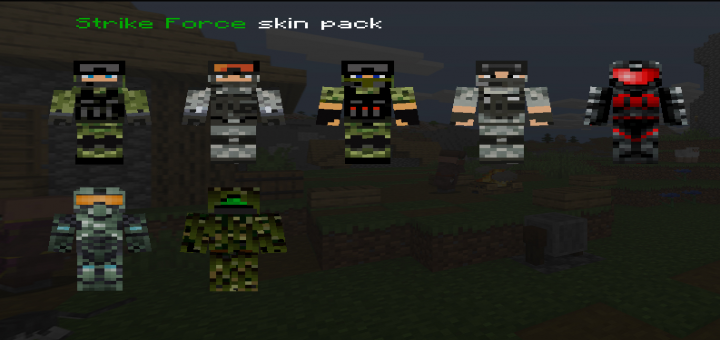
Did you ever want to have an army of your own to protect you against hostile mobs and enemy players? Than get this skin pack so that your enemies shiver at the sight of your mighty new Strike Force skins. This Skin pack is a realistic and fun addition to any roleplay or server meet-up. The Strike Force skin pack currently provides 4 different military styled skins.

Creator: LionStarKF

Select version for changelog:

Changelog
  • Added skin "Elite soldier"
  • Added skin "Special unit force"
  • Added skin "Ghillie suit"

Installation

Supported Minecraft versions

1
Don't try it it instantly tries a hack
1
Colton of the MacBride clan February 19, 2021 at 3:29 pm
I can't even get the bloody thing workin! LionstarkKF, I will track you down like an Irish military dog!
WHATTTT YOU PEOPLE DONT EVEN KNOW HOW TO GET THROUGH ADFLY YOU FOOLS HAHAHAHA XDXDXDXDXD LOLLOLLOLLOLLOLLOLLOLLOL
1
Before, you can get through adfly but now, you have to press subscribe to a virus, now way on earth will I risk that so shut the bloody hell up
Its form 360 miecraft
Wtf all it does is brings me ether to a sexcam website or takes me to adf.ly telling me to press allow when there is no button to press
This dosent work it just sends me to adfly then nothing happens
Downloaded an apk file instantly after clicking the link
Forcing me to allow some adware on my PC to download it.... er no. Just no
To get an Ad free skin just go to MSS (Minecraft Skin Studio) For a skin that has no risk of getting Ads You can install it on Mobile Devices such as Android, Apple, and others... this has no ads it will just ask if you gotten a good skin whenever you want it to Bedrock Edition or Java Edition and then after that it will send a picture of the skin in your images or photos and then that's all you need to do.
1. Install MSS on the Google Store or app store (its free)
2. open the app and look through the menu If you want to get a different skin use #3
3. press on community It will give you a giant list of popular skins if you want something that's not on there use #4
4. Tap the search bar on the left top side of the screen and then type in something that you want. it will either have it or not
5. tap on edit Design or tap on Use in Minecraft (java/Bedrock)
6. it will say "You are about to apply this skin. If you are uploading your skin to the java Edition, you'll be asked to login to Minecraft.net." That's ONLY if you have the PC version of Minecraft PE or Regular Minecraft on PC. Otherwise if you don't want to upload it into Java Hit "Use in Bedrock Edition"
This will then take a while and then send the image to your Pictures and then you can use it!
7. Have fun
Its not free its 4 dollars
why do this website keep getting on my wall.. I cant download it just because of the website.. How can i Download it
yo pensaba que era del strike force de marvel >=V
i do not like that link
How do I install this on iPad.
CommandBlockEngineer January 17, 2019 at 5:25 am
Awesome skin pack dude i rate 5
Is the website safe?
1
Don´t worry, as far as I know media fire is a safe website as is the ad in between.
well it did show me a virus auto download... so it is safe if you have an anti-virus