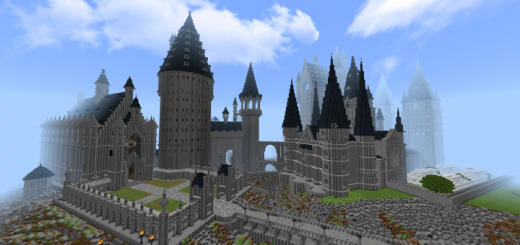
Hogwarts and the Surrounding Areas Version 5

Hogwarts and the Surrounding Areas Version 5

By PoeticWhisper Published 30 Aug 2023 · Updated 5 Sep 2023
4.2

Welcome to the highly anticipated Hogwarts and the Surrounding Areas Version 5!You will find that there's many remade locations, actual useable wands with different spells, flyable thestrals and buckbeak and so much more!

Select version for changelog:

Changelog

Tons of little fixes and consistency errors fixed. Shoutout and thanks to MrStickerBall for being an excellent tester and reporting tons of stuff to get fixed. 

One big addition is there is now a spellbook explaining how to swap spells on all devices and what each spell does. Hopefully it'll help with learning how they work, and using them at their full potential. 

Sink at CoS now works properly, fixed tons of items that weren't renamed properly, fixed lots of blocks that weren't updated and more. 
 

Yet another fix, localization issues fixed. Hopefully fixes wands. 
Supported Minecraft versions

Installation Guides

1
MAKE A VERSION 6!!
1
Hi everyone. First I have to say that this map is INCREDIBLE! I have spent hours on this map with my friends. This map has everything! From the Burrow to Privet Drive to a spot-on replica of Hogwarts. I commend the creator highly for their dedication and unmatched skill on creating this map. It is truly a work of art.

I have seen a LOT of comments saying that they are finding that players who join the game gain fish eye view and speed. This makes it unplayable with others. I have also seen comments regarding the wands and how they are not functioning. HOWEVER, if the player with speed uses the command "/effect @s slowness 10000000 5 true", you will be able to play the game easily enough. Also, if the player with regular speed uses the command "/effect @s speed 10000000 10 true", you will match the other player well enough. Note that these commands work in Education Edition, I have not tested in other versions.

To go with this, you can fiddle around with the FOV in settings to get a view of the world that you like. This eliminates the fish-eye problem. You could also try going into video settings, and turning "FOV Can Be Altered By Gameplay" off.

To those who are using Education Edition and are having trouble with getting the wands to work, here is a tip for you. Before you enter the Minecraft world, click on the world file, and go to SETTINGS. Scroll down on the left until you see Resource and Behaviour Packs. Click on Behaviour packs and click on MY PACKS, then click on the Broomstick icon, and click activate. Enter the world and it should be working.

This is what works for me, and it works super well. Again, nothing but congratulations to the creator for the success of the build.
1
also the hats are just cubes pls fix that too for mine edu pls
1
hey so i downloaded this mod now i use mine craft education it works but the hoggy warts behavior pack is missing which explanes why i cant open the gate with my wand pls fix the glitch or tell me if its because i use education.
1
installed this but when I invite friends they tend to walk extremely fast is there a way to solve this?
1
Hey! I recently downloaded the map when I realised the v5 is out. I love the new changes, though I am having problems with the wand spells and when I try to use the floo network, it telports me back to the main floo. (android btw.)
1
Hi, i’m having some trouble while playing with friends, they’re really fast and the camera vision is weird. Also, where can i find the spellbook? I was having trouble with the wands too, but i think i need to learn spells to make it work properly
1
Hello everybody. I downloaded this map last week and I'm having some problems. The wands don't work properly and don't activate any places that require spells. Everything works perfectly in version 4 of this map, but in this version I'm having a lot of problems. Is there a package I should install? Minecraft win 10.
1
Does anyone have an answer to the fisheye view and moving fast for the person who is not host. I've tried different versions, PC, Android, and switch. It is unplayable with my daughter.
This comment has been removed
1
How do i get sorted into gryfindor? it always lands me in anything but gryfindor
This comment has been removed
Aydin Entertainment June 19, 2024 at 9:19 am
This comment has been removed
1
Why is my girlfriend so fast when she joins the game??
1
OMG finally uploaded! I was really looking forward to meet your new version of Hogwarts😭 Btw, all the interacts with wand doesn't work... ;( Could u fix it? Always thankful for your work!