
Keystone

Keystone

By CTabdul15 Published 7 Feb 2026 · Updated 17 May 2026
85.8k
3.8

Select version for changelog:

Changelog

Add

  • moved to version 2.0.0
    • The saved module settings would reset due to the new way of saving settings, so you need to reconfigure your settings after updating.
  • Settings
    • Added a way to disable giving the menu item on join for new players

Change

  • Fake Blocks
    • When the Module is disabled the fake blocks behave like a regular blocks
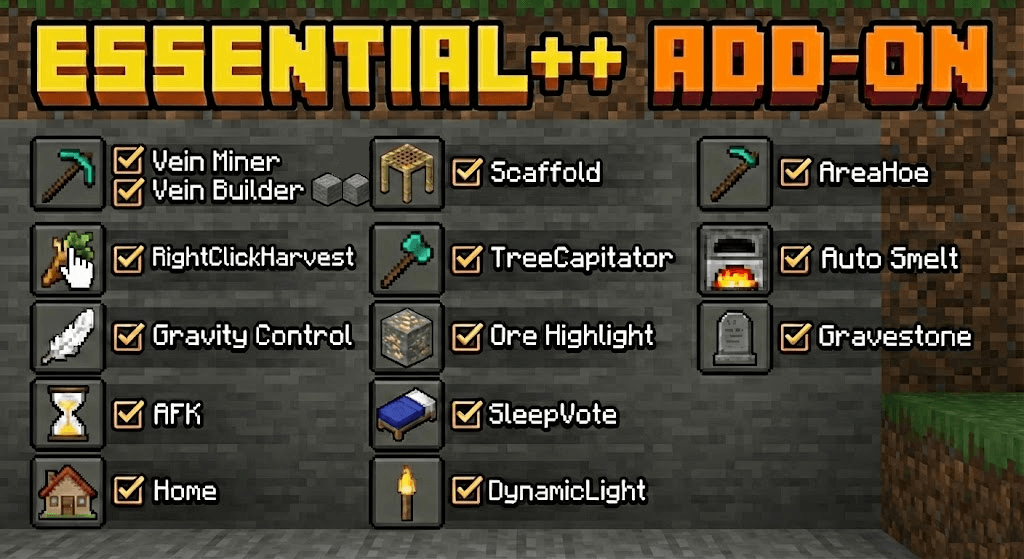
  • Gravestone Module Overhaul
    • Completely redone the Gravestone module to improve reliability and performance.
    • Items are now snapshotted and safely stored into structure files exactly when you die, preventing despawning or data loss from unloaded chunks.
    • Added the new /es:graves command, allowing players to view their active gravestones and remotely recover their items in emergencies.
    • Fixed 'LocationInUnloadedChunkError' bugs that would cause the gravestone creation to fail.
    • Added a 'Place on Highest Block' setting to allow players to choose whether gravestones spawn at the surface or at their exact death elevation.

Fix

  • Bug Fixes
    • Fixed a bug where breaking a waystone without Silk Touch while AutoPickup is enabled would yield no item.
    • Fixed a bug where waystones could be lost if mined while the player's inventory is full.
    • Fixed a bug where you could dupe waystones with the Silk Touch enchantment.
    • Fixed a module conflict where AIOTs would overwrite Area Hoe functionality globally.
    • AIOTs now correctly create grass paths in a radius only when sneaking, and normal right-clicks correctly trigger Area Hoe to till farmland.

Downloads

  • Essential++ v2.0.0 (785.18 KB)

Show all downloads (16 older files)

Installation Guides

Pinned comment
1
Guys, if the file doesn't import, it might be your minecraft version, because this addon support the version 1.21.90 and above

Discord name: ctabdul15
1
It was an amazing add-on and I really enjoy using it! May I suggest a feature for custom teleport coordinates, similar to the vanilla Minecraft "/tp" command but achievement-friendly? I think this would greatly improve exploration and gameplay if integrated into the add-on.
1
It would kind of ruin the add-on, because the add-on adds essential stuff and not stuff where you can cheat.
1
didn't think about that 😅. how about you make a brand new add-on for it?
1
The update to v2.0 also made so all previous waystones from prior version are not available. Horrible upgrade experience.
1
Yeah sorry. It would never happen again it was just a one time thing
1
Why did it have to happen... shouldn't the addon be able to read what is already saved? Our players each have max homes and started to use waystones to compensate, so that's a lot of waystones lost also.
1
We updated to the new 2.0 version but now all players lost their saved /homes.
1
sorry. It would never happen again it was just a one time thing
1
That's too bad, I am not updating, no way to restore every players' homes.
1
I just noticed the AIOTS error a few days ago, but it's fixed now, thanks for the update. Everything is working quite well so far. I would like to ask if it's possible to see the crop status without having to activate "show block state info," as it displays too much information that I don't need to know all the time, unlike the crop status, which is very important.
1
Hmm, that's too specific to have, but I could try to implement it. Thanks.
1
plis fix gravestone not working
1
The gravestone didn't work for me now I lost all my stuff :(
1
1
Ajaiaiiiqiqkqnab1919 April 11, 2026 at 6:39 pm
This comment has been removed
1
Ajaiaiiiqiqkqnab1919 April 11, 2026 at 6:38 pm
This comment has been removed
1
idk if you mean the delay in the settings but you can change it.
1
Ajaiaiiiqiqkqnab1919 April 11, 2026 at 2:36 pm
This comment has been removed
1
But people can drop the item. Or you can remove the item from players with a command if you don't want them to have it. I don't want to let the item owner be the only one sorry. Maybe I can add a new settings where you can disable it for other players.
1
Ajaiaiiiqiqkqnab1919 April 11, 2026 at 2:28 pm
This comment has been removed
1
Disable auto-close in the double-door setting
1
is there a command to make me an admin without having others make me an admin?
1
You can give yourself the "essential++:config_access" tag. /tag add "essential++:config_access"
1
so can u make a feature so when I die and click on the gravestone it will automatically place items at the slots before the death
1
Turns out there was nothing wrong with it i just had to Uninstall and reinstall (my bad)