
Offset Fix

Offset Fix

By allen023 Published 30 Jul 2020 · Updated 13 Aug 2020
3.8

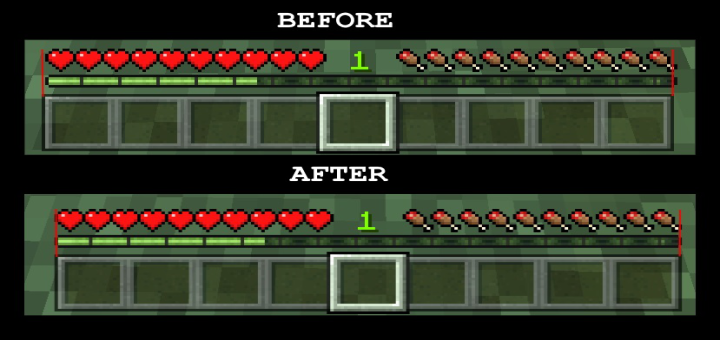
Minecraft Bedrock has a weird offset where the exp bar and the heart, armor, hunger etc.. icons is off by 1 pixel if use a classic UI. But for some reason, the offset of exp bar in pocket UI is align with the hotbars. This texture pack will fix the offset alignment when you use classic UI.

Select version for changelog:

Changelog
Update mcpack link because somehow the link doesn't work when I copied it. 
Supported Minecraft versions

Installation Guides

1
Addontesterandpaster March 22, 2026 at 12:26 pm
this change my life so much
1
Hello there! I regret to inform you that even with this fix, the UI is still off-center. Confused? Allow me to explain.

You see, the top portion of the UI was actually correctly centered the whole time. The bottom portion was actually the part of the UI that was off-centered. With this fix, now both the top and bottom portion of the UI is a few pixels leaning towards the left.
1
This is dumb it moved to like not even a pixel
1
perfect or ppl with ocd just like me
1
it says cant download file...
1
please use the zip link for now, mcpack link is not working, I think it's wrong url. I updated it again please wait.
1
what changed? i looked closely and there is no changed
1
I cannot believe people are arguing over a small thing like this. lol
1
Perfection human be like:
1
I am sorry to say that but this pack is useless. it works and you made the effort but why?
1
It's not useless people keep reporting this on minecraft bug tracker since version 1.11 and it's not getting fix. So I decided to fix it myself.
1
Bro it is useless! You wasted your time to move just 1 pixel in Minecraft.
1
And also you won’t be putting your face in a device and see that like it’s just 1 pixel off you don’t need to worry about it and your make a big deal out of it!
1
And also you won’t be putting your face in a device and see that like it’s just a pixel off you don’t need to worry about it and your make a big deal out of it!
1
Oops I duped it
1
This just doesn't work for me, but 4 stars bc u had a great idea!
I'm running the latest version on windows 10, could you possibly fix it and get it to work??
1
Try removing your other texture pack or put it on the top of your global resource. If you're playing with a map with resource pack with texture pack add it on your map resource pack :)

Also try restarting your game.
1
I love it, it's so symmetrical
1
I dont even notice that just by looking at it