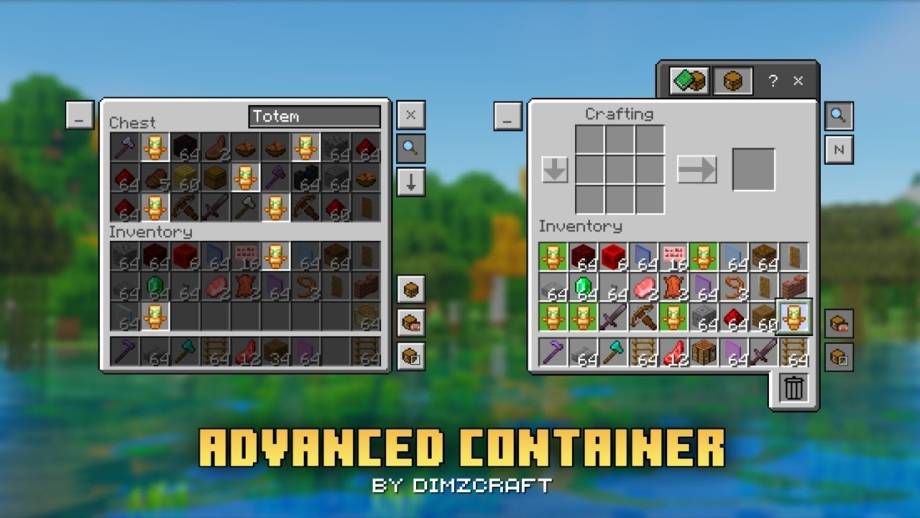

Advanced Container

Advanced Container

By DimzCraft Published 11 Dec 2024 · Updated 6 Jun 2025
145k
4

Select version for changelog:

Changelog

- update pack icon

- changes the selected highlighter to default, and can be disabled via global variable

- change uuid

Downloads

  • Advanced Container v1.2.0.mcpack (82.55 KB)

Show all downloads (1 older files)

Installation Guides

1
Hello, dimz. Thank you for your pack I cannot play without it. However, on the servers i play the drop mode is very very harmful. Is there a way to turn the drop mode off?
1
If possible, please remove the small instruction button in the top left corner because it feels too intrusive (translated with Google Translate).
1
Search bar not working
1
ui/ui_common.json: Child controls must have unique names:

container_item/highlighter

In the future this will be an error and this file won't load.
1
maybe this pack update is a bit delayed
1
there's a bug in the enchanting table when using this pack on 1.21.100 on mobile. when you put an item on the enchanting table, it shows the texts of the enchantments without you hovering to it. disabling this pack reverts it to normal
1
that's normal, that's a feature
1
no, it doesn't. past version of Minecraft didn't do that with this pack. you can literally see the 3 random enchantments (it's on white text, i.e. Bane of ... and it doesn't show the whole text so you can't actually see what level of enchantment it is since when you try to hover on it, it doesn't do anything anymore) if i could send a pic here i would've shown it to you.

I even deleted the .json file for the enchanting table on this pack to see what happens and it turned back to normal, it doesn't show the enchantments anymore after putting an item. although the buttons for placing and dropping items quickly is now gone..
this pack is really good and i would like it if you could pls check that problem out as I'm a 100% sure it's a bug on this pack.

also when you tap on the villager's item trades, (e.g. enchanted books) it doesn't show the name of enchanted books anymore or any item that the villagers trading.

also storage containers now highlights the custom x button for some reason. that includes dispenser,droppers, hoppers, crafters as well but it highlights the container item mode button instead since those did not have a custom x button.

also I can't remember if everything that this pack modified had a custom x button, but it would be nice if the others had one as well. I've noticed only the chests, shulkers and barrels only had custom x buttons.
1
Ah🗿, yes, it's true that I made enchant text on the button for the enchanting screen, but I will fix the name of the book in the trade later, I don't understand the x/close button, if possible, could you send it to the server?
1
This comment has been removed
1
i did a little more testing and realized MY mistake. This texture works fine on it's own but when i add your recipe book plus texture pack over top it glitches out the anvil function
1
Oh, yes, because I haven't made support yet, maybe in the next update
1
That'd be amazing. Until then I'll just have to play without one i guess. Such a shame though, they're both wonderful QOL resources. Keep up the great work!!!
1
it's very well made but can you also make it so that it retains the last selected mode when reopening the inventory?
1
next update remove "?" then it's actually goated
1
Just so you know, android does not allow access to the com.mojang.minecraftpe folder, at least in my experience.