
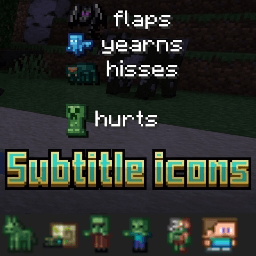
Subtitle icons

7.4k
Select version for changelog:
Changelog
- Fix other languages icon support
- "English (US)",
- "English (UK)",
- "Deutsch (Deutschland)",
- "Español (España)",
- "Español (México)",
- "Français (France)",
- "Français (Canada)",
- "Italiano (Italia)",
- "日本語 (日本)",
- "한국어 (대한민국)",
- "Português (Brasil)",
- "Português (Portugal)",
- "Русский (Россия)",
- "简体中文 (中国)",
- "繁體中文 (台灣)",
- "Nederlands (Nederland)",
- "Български (BG)",
- "Čeština (Česká republika)",
- "Dansk (DA)",
- "Ελληνικά (Ελλάδα)",
- "Suomi (Suomi)",
- "Magyar (HU)",
- "Bahasa Indonesia (Indonesia)",
- "Norsk bokmål (Norge)",
- "Polski (PL)",
- "Slovensky (SK)",
- "Svenska (Sverige)",
- "Türkçe (Türkiye)",
- "Українська (Україна)"
Support 1.26.30+
- Add Sulfer cube Mob icon
- Add shuk cancer icon and more..

Pack=> font folder=>glyph_F2
Try any pixel edit app
Replace your skin
Steve to your skin
Size 16×16
Please make sure the Subtitle Icons pack is placed at the top in Global Resources so another resource pack does not override it.
Also enable Subtitles in settings and use the language "en_US","es_Es" for the icons to appear properly
Make sure the Subtitle Icons pack is active and placed above other packs to avoid conflicts.
Go to the font folder and open "glyph_F2.png". The Steve skin icon is there. Replace it with your own skin face using the same size ("16×16") and keep the image layout unchanged.
Please make sure the Subtitle Icons pack is placed at the top in Global Resources so another resource pack does not override it.
Also enable Subtitles in settings and use the language "en_US" for the icons to appear properly.